
Clinic management · Windows
From the appointment to the cash close — one path, on your clinic’s PC
Clinic+ OS runs the whole clinic on its own computer: appointments, front desk, visits, invoices, insurance, stock and reports — no server, no subscription, and patient files stay in the clinic
- LocalAll data in one folder on the PC
- One payment$200 and the copy is yours
- 5 specialtieswith ready clinical templates
The path
Five stations, each one handing over to the next
- 1Appointmentsa booking or a series of sessions
- 2Front deskarrival, ticket number, call-in
- 3Visitspecialty template, prescription, signature
- 4Invoicecash or insurance, credit note
- 5Closeshift drawer and the accounting month
The first screen every morning
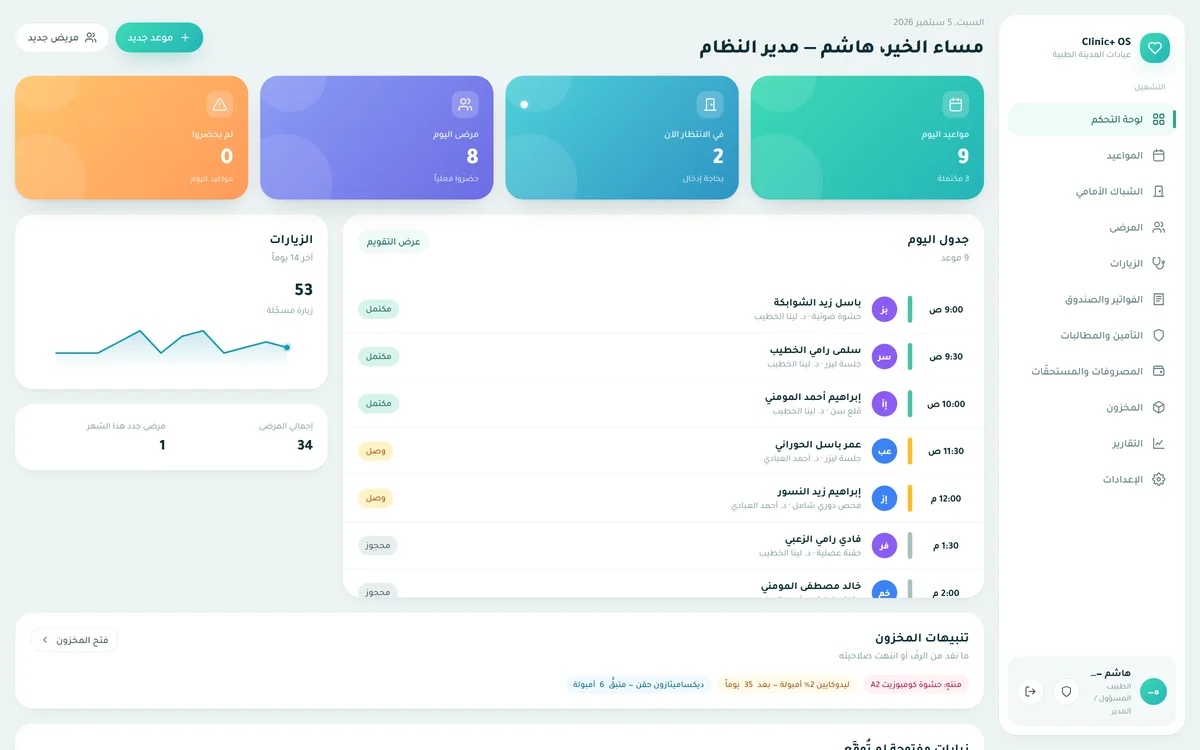
The dashboard — what the team needs before the first patient
A real screenshot from the software, click any card to light up its place
The screens
18 screens, and here are twelve of them — real screenshots
Click any screenshot to enlarge it, names and data are exactly what a new customer sees after installing
Dashboard
Today’s appointments, who is waiting, who did not show, today’s schedule and stock alerts — with no financial figure, on purpose
Appointments
Daily and weekly calendar, recurring session series with a preview before booking and holiday skipping, bulk rescheduling
Front desk
Today’s queue, ticket numbers, calling patients in, and a one-click WhatsApp reminder link
Waiting-room screen
Shown on the waiting-room TV: names truncated (first name plus one letter of the family name), no file number, no service
Patients
Instant search by name, phone, file number or ID, duplicate detection and merging
Visits
Templates per specialty: complaint, exam, diagnosis and plan, prescription and supplies — and a signature that freezes the visit
Invoices and cash
Issue and collect, credit notes, shift drawer and closing, patient statement
Insurance and claims
Payers with their own price lists, pre-approvals, invoice splitting, claims settled with deductions
Stock and supplies
Balance derived from batches, first-expired-first-out dispensing, write-offs with a reason, stock counts, low-stock and expiry alerts
Expenses and payouts
Categorised expenses, doctor commission rules and payouts, month-end accounting close
Reports
Clinical, operational and financial reports by date range, plus owner indicators: profit, receivables ageing, service mix, contribution per doctor
Settings
Nine groups: readiness, clinic and specialty, team and roles, services and templates, data, national e-invoicing, AI, security and audit, licence
Rules that do not break
The past is never edited, and every read is logged
An issued invoice is never edited
It is corrected with a credit note, a signed visit gets a dated addendum, and a closed month accepts no entry dated inside it
Every opening of a patient file is logged
Not only edits — merely opening a file, with who opened it and when, in an audit log the owner can read
Roles are data, not code
The clinic owner creates a role by name and grants any of 25 permissions, and changes apply at once without signing in again
Allergy alerts warn, they do not block
By name, synonyms and drug family, and the interface says plainly that the absence of an alert is not a safety certificate
Patient import from Excel with a preview
The preview writes nothing, phone, date and gender are normalised, duplicates are detected before import
Shared-PC security
A mandatory first-run password, a screen lock that hides without signing out, account lockout after five attempts, session management
Your data
Everything on the clinic’s PC
One folder on the PC — the database, attachments, photos and backups — shared by the whole clinic team, untouched by updates and by uninstalling
Backups are fully local
An automatic backup at start-up, every 6 hours and at every shutdown, plus a full copy to an external drive of your choice, including attachments and photos, with a file that explains how to restore
Works offline — with a known limit
The whole program works without a connection, only the licence needs to check in periodically:
| 14 days since the last check-in | Works fully, nothing changes |
|---|---|
| 7 more days | Grace period: everything works, with an on-screen notice |
| After 21 days | Read-only: files, printing and backups work, saving stops — and resumes at the first connection |
AI
The AI in the program transcribes reports and organises a case, it does not diagnose, does not suggest a drug or a dose, and nothing enters the record without a human click
Specialties
5 specialties with ready clinical templates
- General and internal medicine
- Dentistry
- Dermatology
- Ophthalmology
- Obstetrics and gynaecology
Choosing a specialty filters which templates appear on the visit screen and blocks nothing, with no choice they all appear, and the program understands synonyms such as orthodontics, cosmetic and paediatrics
Ready from the first install
- 41drugs in the formulary
- 8clinical templates
- 4document templates
- 12services with prices
- 12stock items
- 4payers
Pricing
Pay once, and the copy is yours
$200US dollars
One payment — no monthly or yearly subscription
- Every feature: appointments, front desk, visits, invoices, insurance, stock, expenses, reports
- A licence for one clinic PC, transferable to another PC from inside the program
- 5 specialties and 7 print layouts with your clinic’s letterhead and logo
- Audit log, roles, backups, waiting-room screen
Purchases go through our reseller Paddle — card or PayPal
A 14-day trial with every feature
Try it on the clinic’s own PC before you pay, whatever you enter during the trial stays yours
Try 14 daysQuestions
What gets asked before buying
Does it need a server, a database or a cloud subscription?
No, one installer on the clinic’s computer, and everything lives in it: the database, attachments and backups, no server, no account to open
Does it run on more than one PC or more than one branch?
The licence is for one PC and can be moved to another from inside the program, there is no sync between PCs and no multi-branch — and it is not planned
Is there a web version, a mobile app or a Mac version?
No, Windows 10 or later, 64-bit, only
Does it send automatic reminders to patients?
Messages are one click: it opens WhatsApp with a ready message to the patient’s number, no automated messages, no third-party subscription, and the patient’s number never leaves the PC unless you click
Is it certified for national e-invoicing?
The program is ready for national e-invoicing: the structure matches the official guide and is built on a version that was accepted in another product of ours, no invoice from Clinic+ OS has gone through the live system yet, so we do not write “certified”
Windows warns me during install — why?
The installer is not code-signed yet, so Windows shows a SmartScreen screen on first install, click “More info” then “Run anyway”, and take the file from this site only
Which languages?
Arabic only
Has it run in a real clinic?
The program is functionally complete and automatically tested (24 test suites) and has not yet run in a real clinic, which is why you find no customer testimonials here — you find a 14-day trial
Download
Download and try it on the clinic’s PC
A single 95.6 MB installer for Windows 10 or later, 64-bit, nothing else needed
On first install Windows shows a SmartScreen warning because the installer is not code-signed: More info → Run anyway